2.8 Private network connection to on-premise environment
This section describes how to connect Ops I to an on-premise environment via a private network.
(1) Outline
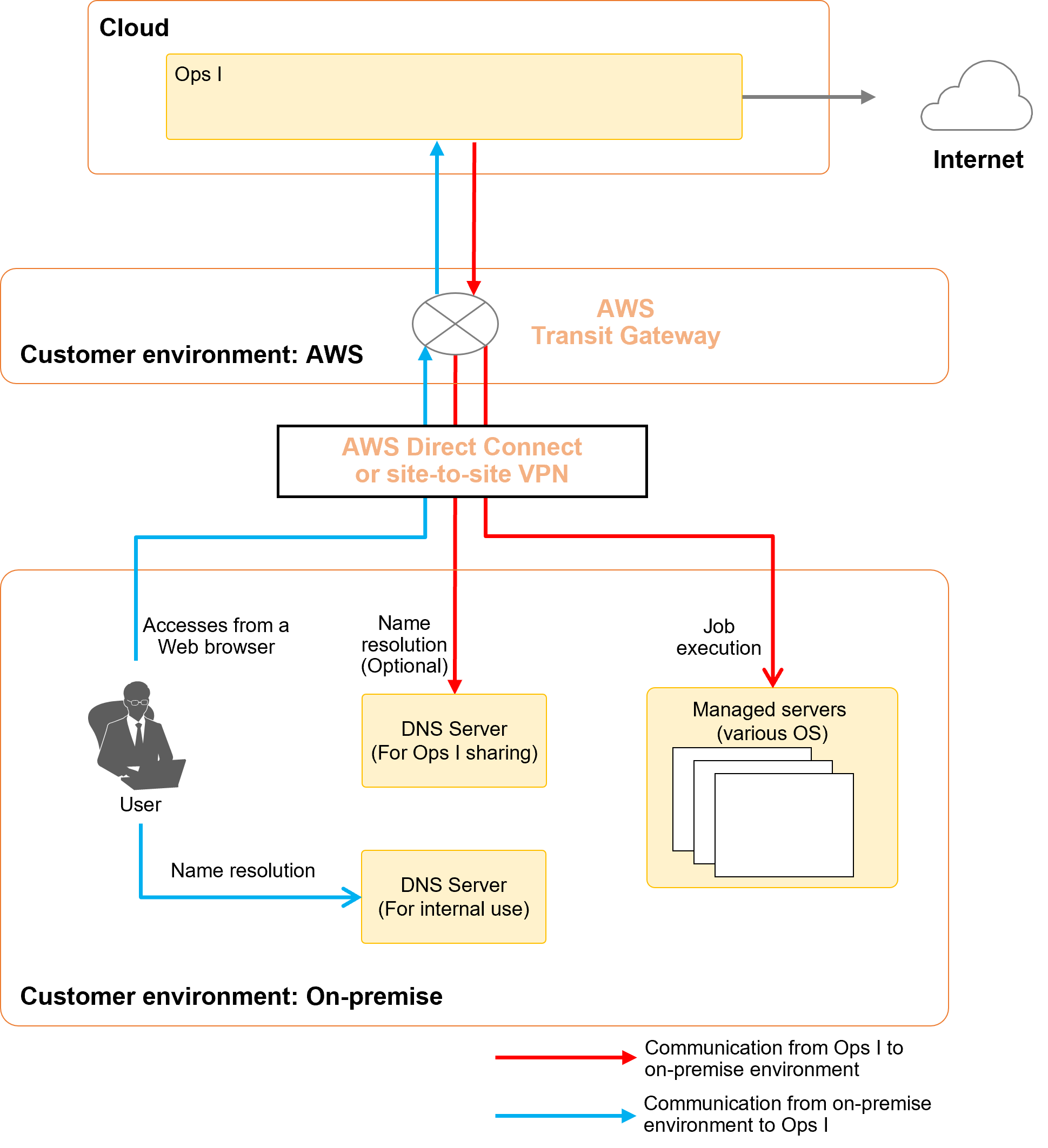
Connects Ops I to the user’s AWS account using the Amazon Web Services (AWS) Transit Gateway.
It also connects the user’s AWS account to the on-premise environment using AWS Direct Connect or a site-to-site VPN.
As a result, the on-premise environment and Ops I can be connected via a private network.
If the environment is set up with a private network connection, it is not possible to access Ops I from the Internet, but it is possible to access the Internet from Ops I.
As a way to connect a user’s AWS account to an on-premise environment, Ops I supports the following methods. Any other method of connection is not supported.
- AWS Direct Connect
- AWS site-to-site VPN
(Figure) Usage illustration of private network connection configuration
(2) Prerequisites
The following must be prepared in advance by the user.
(Table) Items that need to be prepared in advance
| Item | Required | Description |
|---|---|---|
| AWS account | Yes | AWS account of the user to connect with Ops I |
| Transit Gateway | Yes | Transit Gateway to which Ops I connects The Transit Gateway should be prepared in the Tokyo Region of AWS. |
| CIDR for Ops I | Yes | Class A private address used by Ops I (CIDR block size: 21) Prepare a CIDR that does not overlap with the on-premise environment to which you are connecting. Check the interview sheet for private networks available in Ops I. |
| DNS server (For internal use) |
Yes | DNS server used to access Ops I from on-premise environment Required for equipment in an on-premise environment to perform host name resolution. |
| DNS server (For Ops I sharing) |
No | DNS server used to access servers in on-premise environment from Ops I Required for host name resolution when managing servers in an on-premises environment from Ops I. The following information on the DNS server (for Ops I sharing) is also required.
|
| Information on managed servers | No | The following information about the managed servers in the on-premise environment to be managed and operated from Ops I (e.g., My Workflow)
|
(3) Connection flow
The connection is made as follows.
Connect the prepared user's AWS account to the on-premise environment via AWS Direct Connect or site-to-site VPN. When connecting, prepare a Transit Gateway in your AWS account and configure the routing settings so that communication is sent to the Transit Gateway.
Share the prepared Transit Gateway to Ops I's AWS account. Transit Gateway approval process is performed on the Ops I side.
When managing servers in an on-premise environment from Ops I, it is necessary to grant permission to connect to the managed servers. Fill out the interview sheet and send it to the address indicated on the interview sheet. An attachment to the shared Transit Gateway is created when the Ops I environment is built. If there is a request for approval of an attachment, perform the approval process.
When accessing the Ops I URL from an on-premise environment, it is necessary to configure a DNS server or similar to allow name resolution of the Ops I host name. Configure the routing for the AWS account and on-premise environment based on the Ops I environment information (URL, IP address). Ops I environment information will be shared upon completion of the Ops I environment build.