4.1.1 Associations between functions & required knowledge
The associations between each function are shown in the figure below.
(Figure) Associations between each function
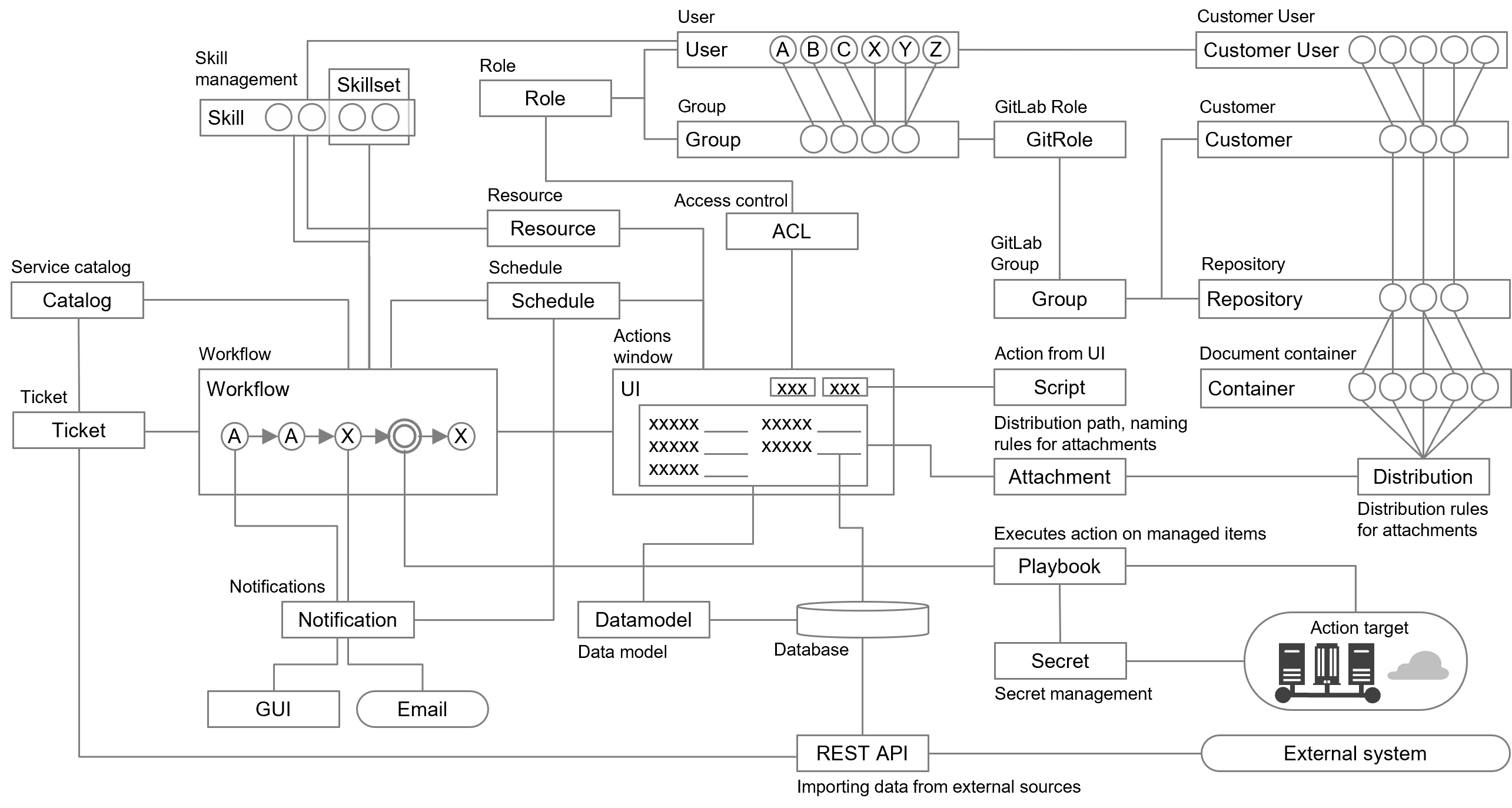
The knowledge required for each function is as follows.
[Document management]
(Table) Functions and prerequisite knowledge for document management
| Function name | Outline | Prerequisite knowledge |
|---|---|---|
| Attachment | Define distribution paths and naming rules for files attached through the UI. Dates, serial numbers, etc. can be added to folder names. | YAML (GitLab) |
| Distribution | Attachments, trails, etc. can be assigned to per-customer repositories or fixed repositories can be designated. | YAML (GitLab) |
| Repository | Refers to repositories for various documents. The physical layer of the document container. | YAML (defined in Distribution) |
| Customer | Refers to customer users' customers. | OTOBO |
| Container | Various documents can be viewed, uploaded, downloaded, renamed, and deleted within the group to which the logged-in user belongs. In addition, shared containers that can be viewed by multiple users can be defined using the Library function. | GUI YAML (GitLab) |
[Operation management]
(Table) Functions and prerequisite knowledge for operation management
| Function name | Outline | Prerequisite knowledge |
|---|---|---|
| Workflow | Define actions, roles, and groups for each workflow step. | YAML (GitLab) StackStorm |
| UI | Define UI items to be displayed for each workflow step. Items (data), input restrictions, buttons, etc. can be defined. | YAML (GitLab) |
| Datamodel | Manage data models (tables and columns) for operation. Items on the UI are defined by combining tables. | YAML (GitLab) |
| Script | Define actions to be performed when menus, buttons, checkboxes, etc. on the UI are operated. Message outputs, workflows, API executions, etc. can be defined. | YAML (GitLab) JavaScript |
| Notification Notifier |
Notification can be made to the agent in charge of each workflow step and to the requester upon completion of the request. It is also possible to assign or configure agents to be notified according to schedule. Notification is made via the GUI or e-mail. | YAML (GitLab) |
| Skill | Define how to visualize the experiences, qualifications, and other skills that each user possesses. | YAML (GitLab) |
| Skillset | Define a set of skills required to perform each workflow step. | YAML (GitLab) |
| Playbook | Ansible playbooks can be performed. | YAML (Ansible) |
| Secret | Used to manage credential information for each managed object (server, cloud, and tool). Only static secrets are supported. | Vault |
| Calendar | Template for schedule calendars. Work items can be defined. | YAML (GitLab) |
[Service management]
(Table) Functions and prerequisite knowledge for service management
| Function name | Outline | Prerequisite knowledge |
|---|---|---|
| Catalog | Manage service catalogs. From catalog items, you can execute workflows, display the UIs (for request etc.) and record lists, and start ticket management. | YAML (GitLab) |
| Ticket | Manage tickets for requests, incidents, etc. | GUI YAML (GitLab) OTOBO |
| Schedule | Manage groupings of schedules, recurrence settings, and automatic execution through associations of workflows. The schedule assigned for each operation is automatically reflected and schedules can be managed for each user. | GUI YAML (GitLab) |
| Resource | Manage users by granting or revoking skills, for example. | GUI |