2.7.2.1 Updating SAML certification
SAML uses certificates to verify the legitimacy of the communication destination.
To verify that the external IdP to be linked is the correct communication destination, enable [Validate Signatures] for the SAML connection setting and register the external IdP’s certificate with Ops I.
Certificates have an expiration date and must be renewed periodically.
The following procedure describes renewing certificates. For details on SAML connection settings, see “Setting up SAML connection” and “Adding SAML”.
(Figure) Procedure for updating SAML certification
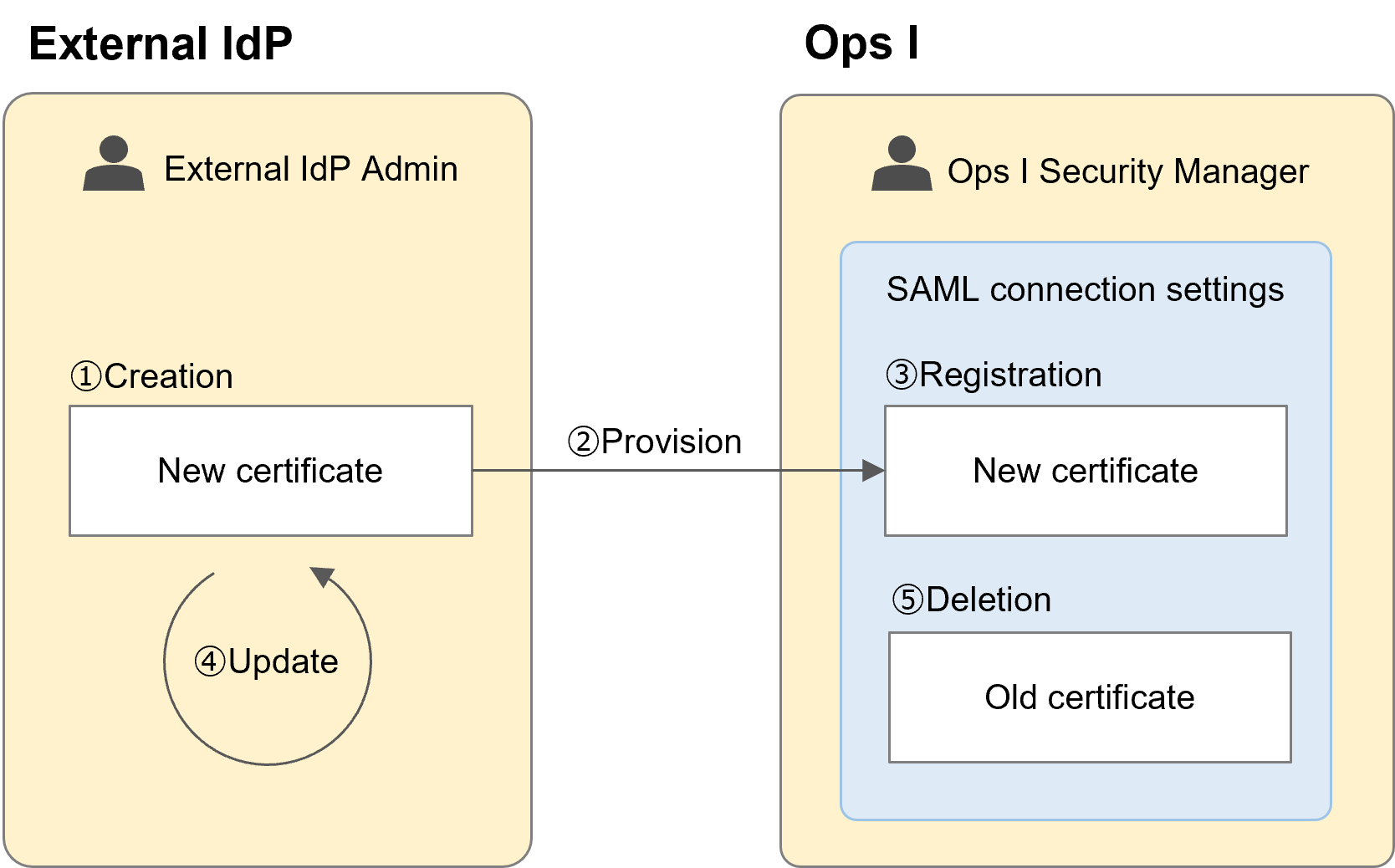
The following is the procedure for renewing a registered certificate.
When registering a certificate for the first time, perform steps ①, ②, and ③ in the above figure.
The value to register is the "X509Certificate" in the IdP metadata (XML file). This format is the same as the body of the PEM format of certificates (without header, footer, or line breaks). Since it is possible to register multiple certificates by separating them with commas, this procedure should be done with both new and old certificates registered.
For examples of the IdP metadata and certificate, see "IdP metadata example".
 Notes
Notes
When updating certificates, be sure to first perform the renewal to a new certificate and then delete the old certificate. If you delete the old certificate first, you will not be able to connect to Ops I due to a certificate mismatch.
<IdP metadata example> The red part is the certificate.
<md:EntityDescriptor xmlns="urn:oasis:names:tc:SAML:2.0:metadata" xmlns:md="urn:oasis:names:tc:SAML:2.0:metadata" xmlns:saml="urn:oasis:names:tc:SAML:2.0:assertion" xmlns:ds="http://www.w3.org/2000/09/xmldsig#" entityID="https://example.com/realms/idp">
<md:IDPSSODescriptor WantAuthnRequestsSigned="true" protocolSupportEnumeration="urn:oasis:names:tc:SAML:2.0:protocol">
<md:KeyDescriptor use="signing">
<ds:KeyInfo>
<ds:KeyName>P5deVpzD88c0h1u7qg63_fXXBdfiX_th1i-kfTLeEIU</ds:KeyName>
<ds:X509Data>
<ds:X509Certificate>MIIBcjCCARygAwIBAgIUV33C54RMqKxEuWAJ9rdLhNuYNmEwDQYJKoZIhvcNAQELBQAwFjEUMBIGA1UEAwwLZXhhbXBsZS5jb20wHhcNMjQwNzIyMDczNTEyWhcNMjUwNzIyMDczNTEyWjAWMRQwEgYDVQQDDAtleGFtcGxlLmNvbTBcMA0GCSqGSIb3DQEBAQUAA0sAMEgCQQCtqVE02E/C6uYsORGampLbJBLTFcYN88mG7TjRNbC8+kOtP56/9LpkHQESoKjt9FTMHCbp3UYkLg2yuq0ctPgXAgMBAAGjQjBAMB0GA1UdDgQWBBRGJbvX/33QesFamto70nGRj0IgETAfBgNVHSMEGDAWgBRGJbvX/33QesFamto70nGRj0IgETANBgkqhkiG9w0BAQsFAANBAEynz092ohuQi/ZLbfzbNDYw5EGuqPFpV/7JXiegd928TpeyOf69mvpnGSg0VTNog4jppyt7uWZAtqsG4KLLYmQ=</ds:X509Certificate>
</ds:X509Data>
</ds:KeyInfo>
</md:KeyDescriptor>
<md:ArtifactResolutionService Binding="urn:oasis:names:tc:SAML:2.0:bindings:SOAP" Location="https://example.com/realms/idp/protocol/saml/resolve" index="0"></md:ArtifactResolutionService>
<md:SingleLogoutService Binding="urn:oasis:names:tc:SAML:2.0:bindings:HTTP-POST" Location="https://example.com/realms/idp/protocol/saml"></md:SingleLogoutService>
<md:SingleLogoutService Binding="urn:oasis:names:tc:SAML:2.0:bindings:HTTP-Redirect" Location="https://example.com/realms/idp/protocol/saml"></md:SingleLogoutService>
<md:SingleLogoutService Binding="urn:oasis:names:tc:SAML:2.0:bindings:HTTP-Artifact" Location="https://example.com/realms/idp/protocol/saml"></md:SingleLogoutService>
<md:SingleLogoutService Binding="urn:oasis:names:tc:SAML:2.0:bindings:SOAP" Location="https://example.com/realms/idp/protocol/saml"></md:SingleLogoutService>
<md:NameIDFormat>urn:oasis:names:tc:SAML:2.0:nameid-format:persistent</md:NameIDFormat>
<md:NameIDFormat>urn:oasis:names:tc:SAML:2.0:nameid-format:transient</md:NameIDFormat>
<md:NameIDFormat>urn:oasis:names:tc:SAML:1.1:nameid-format:unspecified</md:NameIDFormat>
<md:NameIDFormat>urn:oasis:names:tc:SAML:1.1:nameid-format:emailAddress</md:NameIDFormat>
<md:SingleSignOnService Binding="urn:oasis:names:tc:SAML:2.0:bindings:HTTP-POST" Location="https://example.com/realms/idp/protocol/saml"></md:SingleSignOnService>
<md:SingleSignOnService Binding="urn:oasis:names:tc:SAML:2.0:bindings:HTTP-Redirect" Location="https://example.com/realms/idp/protocol/saml"></md:SingleSignOnService>
<md:SingleSignOnService Binding="urn:oasis:names:tc:SAML:2.0:bindings:SOAP" Location="https://example.com/realms/idp/protocol/saml"></md:SingleSignOnService>
<md:SingleSignOnService Binding="urn:oasis:names:tc:SAML:2.0:bindings:HTTP-Artifact" Location="https://example.com/realms/idp/protocol/saml"></md:SingleSignOnService>
</md:IDPSSODescriptor>
</md:EntityDescriptor>