2.7.1 Setting up OIDC connection
This section describes the connection setup procedure when using OIDC as the protocol for authentication for external IdP linkage.
When using OIDC, the following conditions must be met.
- The external IdPs support authorization code flows
- User ID (username), first name, last name, and e-mail address can be obtained with an ID token or UserInfo endpoint
The following is the procedure for setting up OIDC connection.
(Figure) Setting up OIDC connection
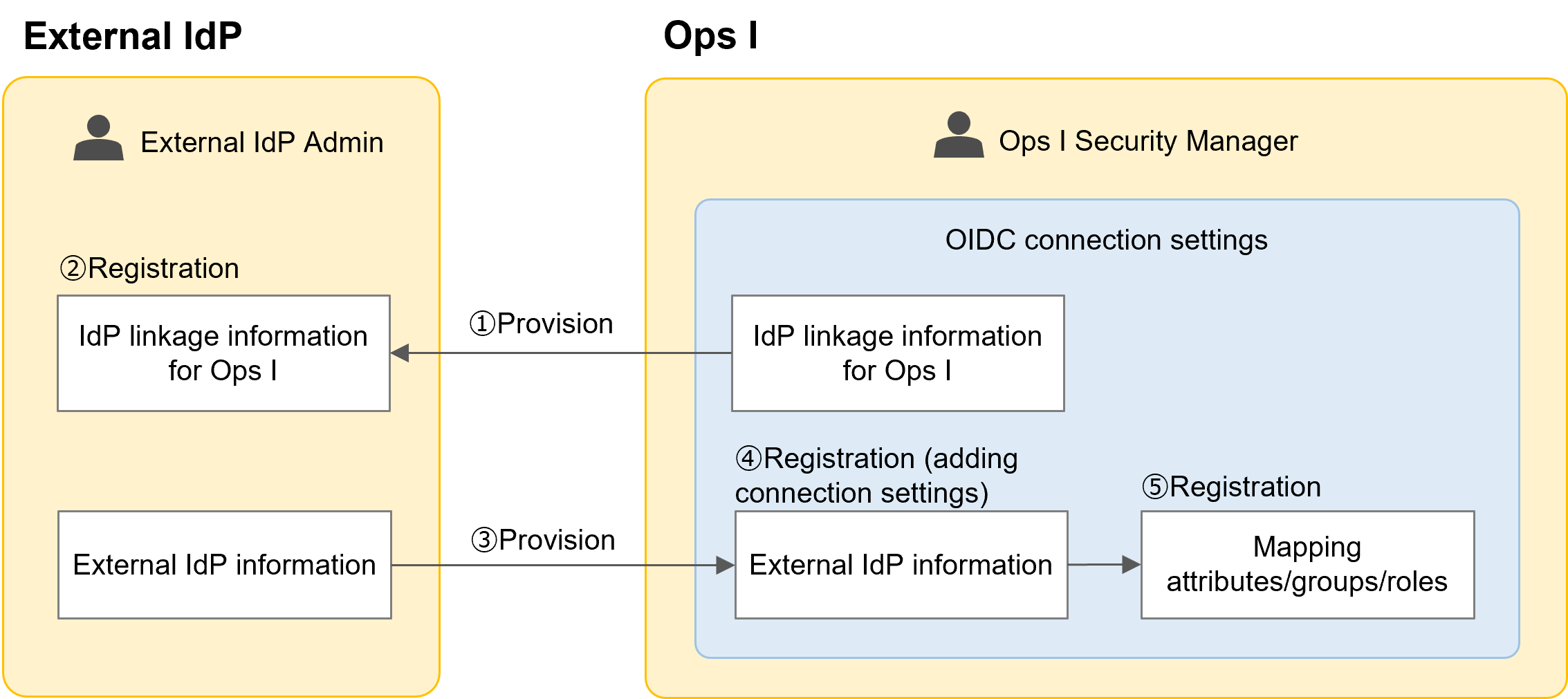
① Providing external IdP linkage information set in Ops I to the external IdP
The Ops I security administrator provides the redirect URI information to the external IdP administrator. The [Redirect URI]* is determined based on the Ops I domain and the OIDC connection setting [ID] as below, so the [ID] must be determined in advance.
Redirect URI: https://auth.Ops I Domain/realms/opsi/broker/OIDC connection setting [ID]/endpoint
The Ops I security administrator provides the redirect URI information to the external IdP administrator. The [Redirect URI]* is determined based on the Ops I domain and the OIDC connection setting [ID] as below, so the [ID] must be determined in advance.
Redirect URI: https://auth.Ops I Domain/realms/opsi/broker/OIDC connection setting [ID]/endpoint
*For some external IdPs, the redirect URI may be referred to as callback URL.
② Registering external IdP linkage information in Ops I with the external IdP
The external IdP administrator configures the external IdP with the external IdP linkage information provided in Step ① so that Ops I can be connected to the IdP as a relying party (RP).
The external IdP administrator configures the external IdP with the external IdP linkage information provided in Step ① so that Ops I can be connected to the IdP as a relying party (RP).
③ Providing information set in the external IdP to Ops I
The external IdP administrator provides the information set in the external IdP to the Ops I security administrator. The information you are asked to provide depends on how you register for Ops I.
The external IdP administrator provides the information set in the external IdP to the Ops I security administrator. The information you are asked to provide depends on how you register for Ops I.
- For manual registration
The external IdP administrator provides information of each endpoint, client ID, client secret, and information needed for connection to the Ops I security administrator. - For partially automatic registration
The external IdP administrator provides discovery endpoint information, client ID, client secret, and other information needed for connection to the Ops I security administrator.
④ Adding an OIDC connection setting and registering external IdP information with Ops I
The Ops I security administrator adds an OIDC connection setting and registers the external IdP information provided in Step ③ in it. When using a discovery endpoint, each endpoint and other information can be automatically entered.
Discovery endpoints can only be specified when adding a new OIDC connection setting.
For information on adding an OIDC connection setting and using a discovery endpoint, see "Adding OIDC".
The Ops I security administrator adds an OIDC connection setting and registers the external IdP information provided in Step ③ in it. When using a discovery endpoint, each endpoint and other information can be automatically entered.
Discovery endpoints can only be specified when adding a new OIDC connection setting.
For information on adding an OIDC connection setting and using a discovery endpoint, see "Adding OIDC".
⑤ Registering attribute/group/role mappings
Register external IdP user attribute information and Ops I user attribute information and group and role mappings. For details, see "Mapping attributes/groups/roles".
Register external IdP user attribute information and Ops I user attribute information and group and role mappings. For details, see "Mapping attributes/groups/roles".