2.7.3 Mapping attributes/groups/roles
To link external IdP users with Ops I users, map attribute information, groups, and roles of Ops I users based on attribute information of external IdP users.
Multiple mapping configurations can be registered for each OIDC or SAML connection setting.
The mappings are configured by Ops I security administrators.
(Figure) Mapping outline
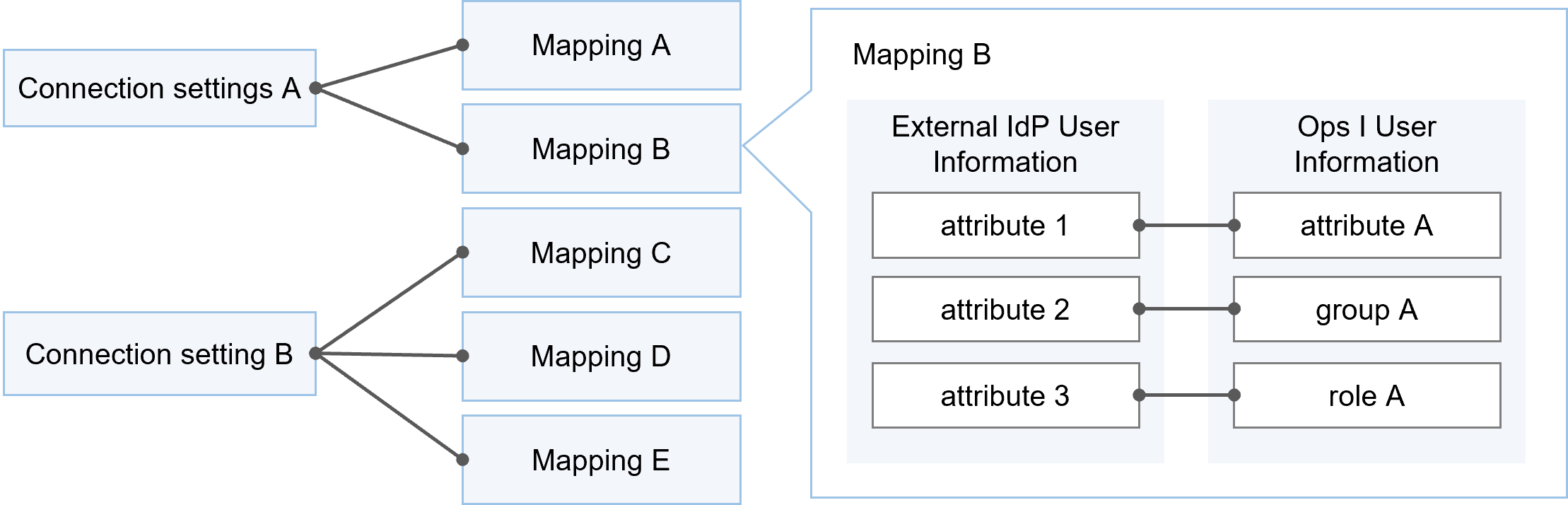
The following attributes are required in Ops I user profiles and must be assigned values by manual or automatic mapping. If any of the values are missing, a login error will occur.
- E-mail address
- First name
- Last name
Mappings are configured in the mapping tab on the [Advanced Connection Settings] window. For details, see “Mapping tab”. For information on setting up OIDC connection, see “Setting up OIDC connection” and “Adding OIDC”. For information on setting up SAML connection, see “Setting up SAML connection” and “Adding SAML”.
 Notes
Notes
- If you want to allow customer users to log in using an external IdP, you need to set up a mapping so that the user attribute "Customer" is assigned to a Ops I role (Customer User or Customer Manager).
If the appropriate customer or Ops I role is not applied, there is a possibility that records (tickets, workflows, etc.) that are not related to the affiliated customer may be referenced or updated. - When logging in using an external IdP, the user that is created will be a billing user. If you want to create a non-billing user, map the Ops I role that includes the free_user role.
(1) Where to obtain and set attribute information
This section describes where to obtain and set attribute information of external IdP users.
[Obtaining attribute information]
Attribute information of external IdP users to be used for mapping can be obtained from the following.
- For OIDC:
Claim, which is a user attribute in OIDC, can be obtained from ID tokens or the UserInfo endpoint.
In the [Scope] item of OIDC connection settings, you must specify the scope that contains the Claim you wish to obtain. - For SAML:
Attribute, which is a user attribute in SAML, can be obtained from SAML assertions included SAML responses.
It is also possible to set fixed values without using external IdP user attribute information. When using fixed values, values can be specified for each connection setting. For example, a specific external IdP user can be mapped as customer A.
[Where to set attribute information]
Below are where to set obtained attribute information.
- Attribute values of Ops I users
Attribute values that can be specified: e-mail address, first name, last name, company, department, address, phone number 1, phone number 2, memo, customer (customer ID) - For obtained attributes, configure conditions to assign to groups that meet them
- For obtained attributes, configure conditions to assign to roles that meet them
(2) Synchronization mode
Obtained external IdP user attribute information is set in Ops I user information according to the mapping settings. Synchronization modes refer to the timings when obtained attributes are set in Ops I user information. [Sync Mode] is selected from the following.
- Inherit: The synchronization mode set in the connection setting is inherited
- At creating user: Synchronization is reflected when creating a user in Ops I after logging in for the first time when there is no user in Ops I that is linked with an external IdP
- Every logging in: Synchronization is reflected each time the user logs in to Ops I through an external IdP. When an external IdP user’s attribute information is updated and then the user logs in to Ops I, the information of the linked Ops I user is also updated.
The synchronization mode can be set in the mapping tab. For details, see “Mapping tab”.
For information on configuring synchronization modes in connection settings, see “Adding OIDC” and “Adding SAML”. In both cases, the connection setting edition window is used.
(3) Automatic mapping
Some of attribute information of external IdP users is mapped without any manual settings. Automatic mapping operates in the same way as [When creating users] in [Synchronization Mode].
Below are attributes that are automatically mapped for OIDC and SAML.
- For OIDC
For the following Claims, mappings are automatically applied.
*preferred_username overrides the user name.Claim name User attribute preferred_username Username email E-mail address given_name First name family_name Last name - For SAML
If the following friendly names are set, the mapping will be applied automatically.Friendly name User attribute email E-mail address
(4) Value conversion
When Ops I user attribute information is configured through automatic or manual mapping, if the requirements of the allowed characters in Ops I are not met, values will be automatically converted or a login error will occur.
For information on the characters allowed for each attribute, see “Notes on characters that can be entered”.
(Table) Value conversion and login error for each user attribute
| User attribute | Value conversion and login error |
|---|---|
| E-mail address | A login error occurs |
| First name Last name Company Department Address Memo |
Trailing characters are trimmed if the maximum number of characters is exceeded |
| Phone number 1 Phone number 2 |
|
| Customer | Ignored if no relevant customer ID exists in Ops I |