2.7 Setting up external IdP linkage
This section provides an overview of single sign-on through external identity provider (IdP) linkage and its configuration.
The protocol used for authentication between Ops I and the external IdP supports the following.
- OIDC (OpenID Connect)
- SAML (Security Assertion Markup Language)
Single sign-on through external IdP linkage allows external application users to log in to and operate Ops I, ensuring seamless integration between external applications and Ops I.
For the external IdP linkage, the Ops I security administrator is responsible for configuration on the Ops I side, and the external IdP administrator is responsible for configuration on the external IdP side. Ops I security administrators are users assigned the Pre-Installed role “System Security Administrator” or the Primitive role “user_admin”.
(1) Configurations of external IdP linkage
The configurations of external IdP linkage are as follows.
[Configurations when using OIDC]
For OIDC, there are two configurations: VPN configuration or non-VPN configuration.
For information on setting up OIDC, see “Setting up OIDC connection”. Mapping of external IdP user attribute information to Ops I user attribute information, groups, or roles is required when setting up OIDC connections. For details on the mapping, see “Mapping attributes/groups/roles”.
-
When using the non- VPN configuration
The external IdP to be linked with must be publicly available on the Internet.
Also, outbound communication must be permitted to allow Ops I to communicate with external IdPs.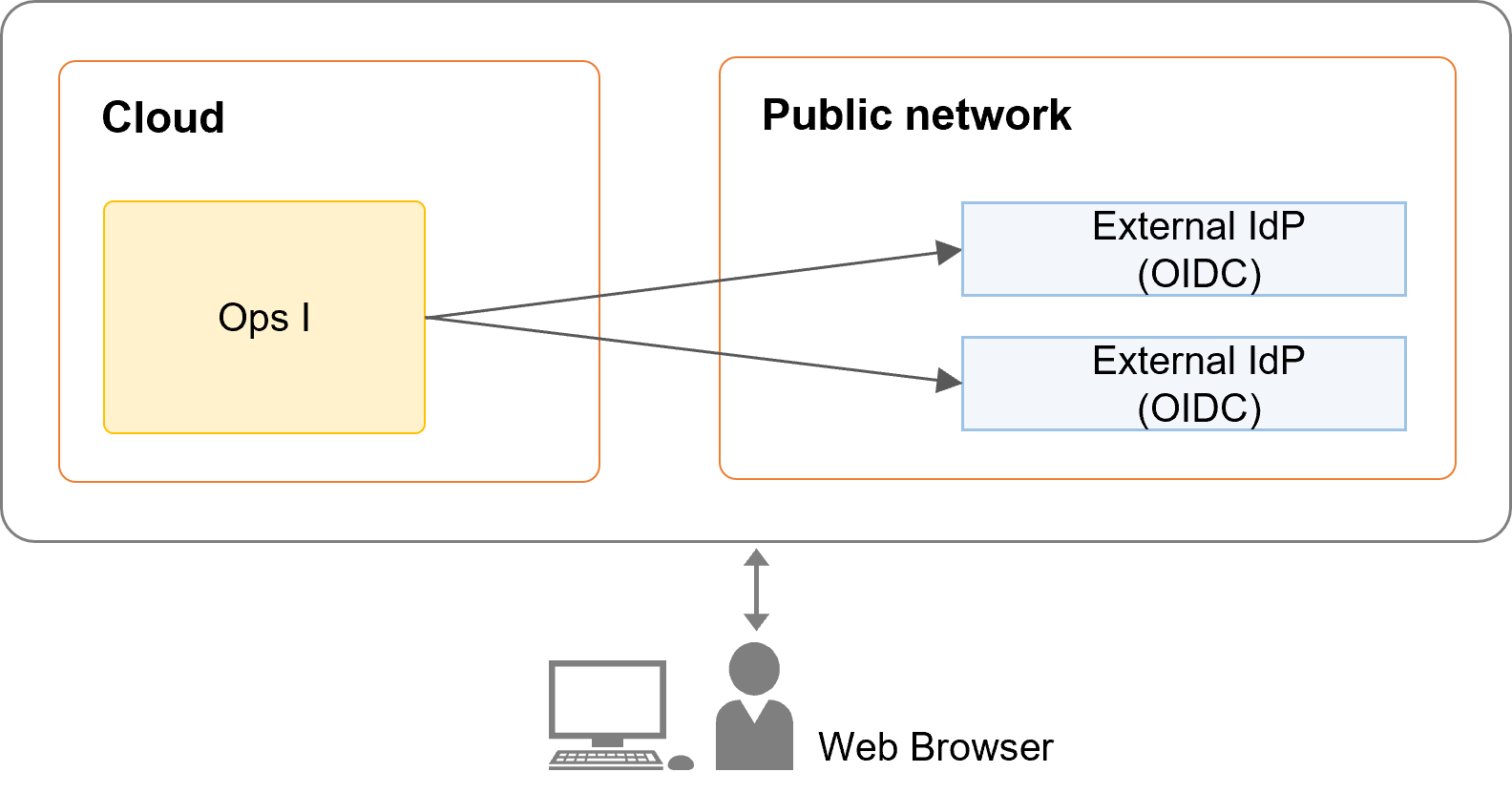
-
When using the VPN configuration
The external IdP must exist within the range where communication is possible through the VPN.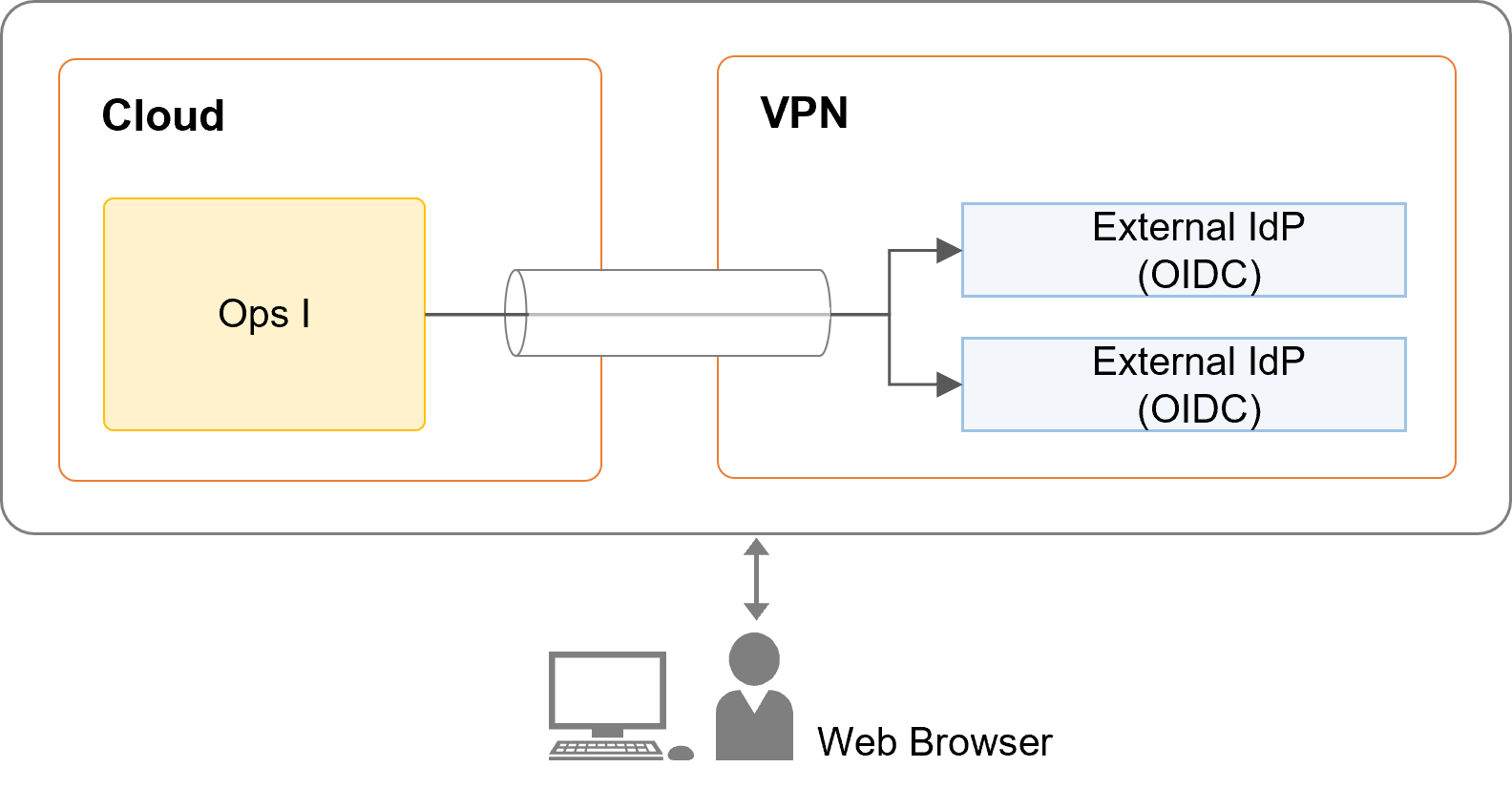
[Configurations when using SAML]
SAML authentication in Ops I supports SP initialized SSO.
The browser must be able to communicate with the external IdP. When using SAML, outbound communication does not have to be permitted because Ops I and external IdPs do not communicate directly with each other, such as browser and Ops I, or browser and external IdP.
For information on setting up SAML providers, see “Setting up SAML connection”. Mapping of external IdP user attribute information to Ops I user attribute information, groups, or roles is required when setting up SAML connections. For details on the mapping, see “Mapping attributes/groups/roles”.

(2) Log in/log out
When logging in through external IdP linkage, the login action varies depending on whether the user is logging in from an external IdP or Ops I, and whether the user is already linked with an external IdP or not.
For details on logging in and out, see “Log in/log out”.
Single sign-out via external IdP linkage is not supported.
(3) Association between Ops I users and external IdP users
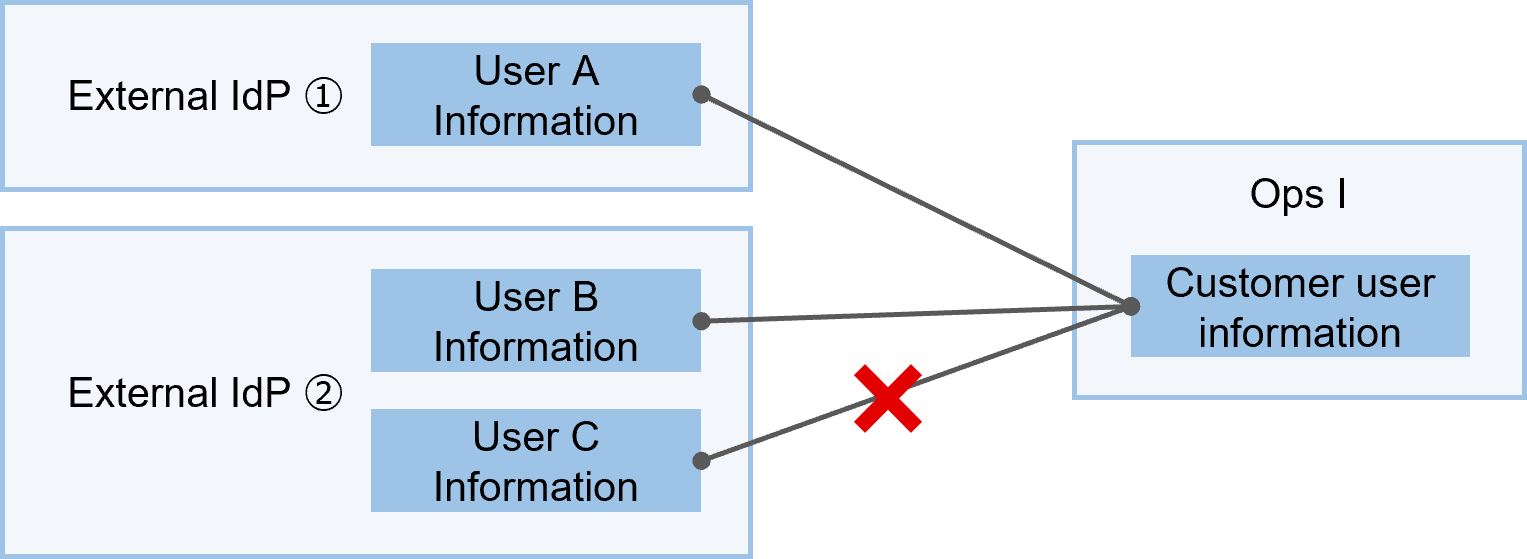
External IdP linkage allows for the creation and use of multiple types of external IdPs.
Ops I users can be associated with one user per external IdP. A single Ops I user cannot be associated with multiple users in the same external IdP.
(Figure) Association between Ops I users and external IdP users
(4) Deleting users linked with external IdPs
When a user is deleted in an external IdP, the Ops I user linked with that user is not deleted from Ops I. To delete linked Ops I users from Ops I, the Ops I security administrator must manually delete the user from Ops I. For information on deleting Ops I users, see “Deleting users”.
(5) Changing/deleting/re-setting Ops I passwords of users linked with external IdPs
This section describes the deletion and re-setting of Ops I passwords of users that have already been linked with external IdPs.
[Changing Ops I passwords of users linked with external IdPs]
Users logged in with an external IdP cannot change their Ops I password. Therefore, if the user is logged in to Ops I with an external IdP, the [Account Management] menu will not appear.
For details on [Account Management], see “Account management”.
[Deleting Ops I passwords of users linked with external IdPs]
Deletion of Ops I passwords is performed by the Ops I security administrator on the [User Details] window.
Ops I passwords can only be deleted for users linked with external IdPs. For users who only log in through external IdPs, deleting their passwords eliminates the need for periodic password updates required by the password policy.
If you delete a user’s Ops I password, the user will no longer be able to log in directly to Ops I.
For details on the [User Details] window, see “Viewing user details”.
[Re-setting Ops I passwords of users linked with external IdPs]
Resetting the Ops I password of an Ops I user linked to an external IdP when the Ops I password has been deleted or initialized depends on the user performing the action. The following shows the user performing the action and the methods.
- For Ops I security administrator
Initialize the password on the [User Details] window for the user whose password is to be reset. When a password is initialized, an e-mail is sent to that user prompting them to re-enter their password. The user can reset their password by following the instructions in that e-mail. - For user who resets their own Ops I password themselves
Click “Forgot your password?” on the Ops I login window, you will receive an e-mail prompting you to re-enter your password as you did when you initialized your password, and you can follow the instructions in that e-mail to reset your password.
For details on the [User Details] window, see “Viewing user details”.
Section structure
2.7.1 Setting up OIDC connection
2.7.2 Setting up SAML connection
2.7.3 Mapping attributes/groups/roles
2.7.4 Log in/log out