2.6.2 Notification using an email server
Your email server can be used for email notification.
(Figure) Configuration for email notification using an email server
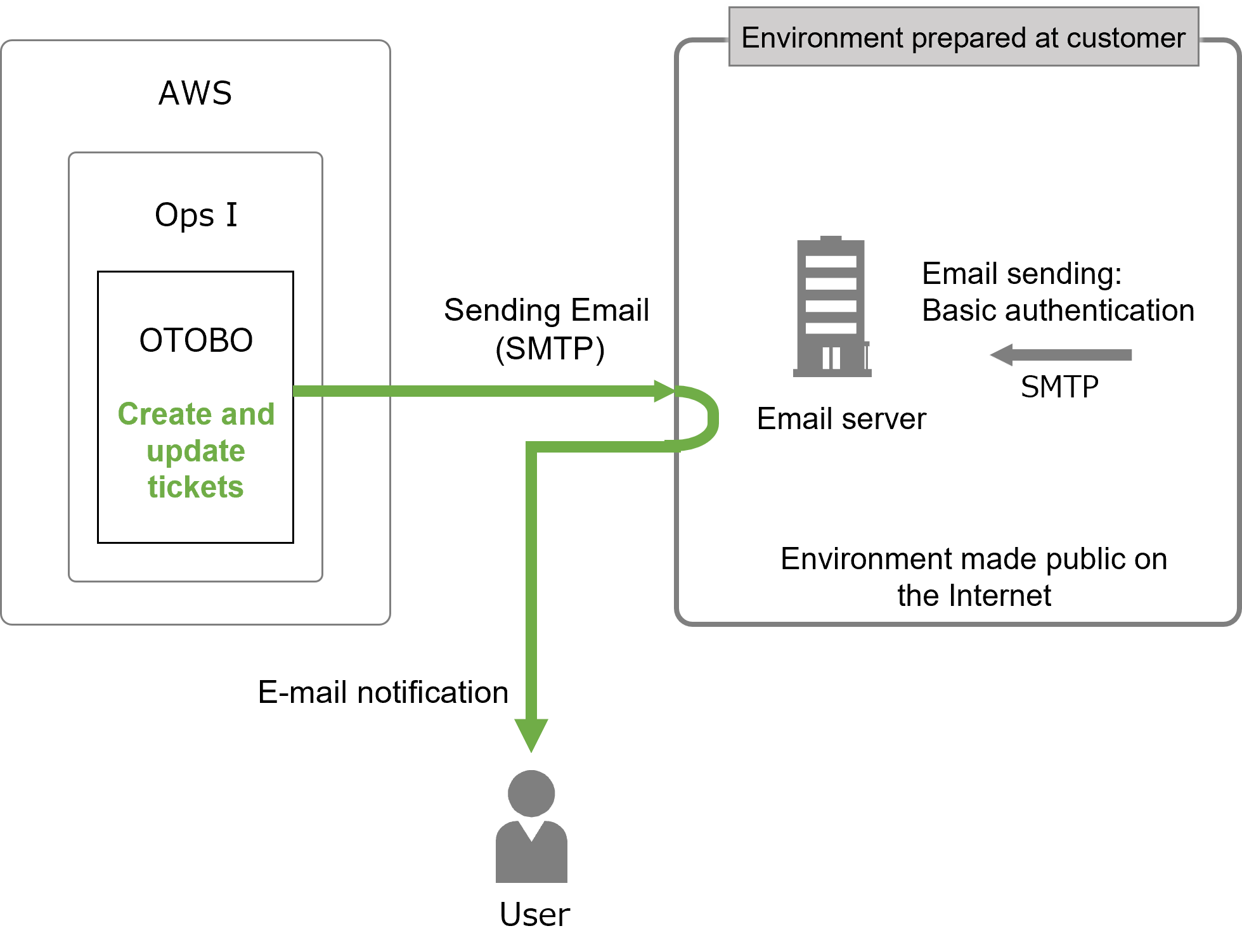
The prerequisites and setting items are as follows.
[Prerequisites]
To use the “Email Notification” function, an email sending environment must be prepared.
Prepare an email sending environment that suits the functions used in the user environment.
■ Environment preparation
The mail server must be in an environment open to the Internet with connectivity from Ops I.
 Note
Note
- The port number used for each protocol cannot be changed.
- In order to communicate from Ops I to the email server, it is necessary to set the information (IP address and port number) of the connection destination when building the Ops I environment.
In the hearing sheet provided by us, please provide information on the email server to be connected from Ops I. - For email servers connected from OTOBO, it is necessary to allow communication from Ops I.
Information (IP address, etc.) used for communication from Ops I is configured when the Ops I environment is built, so please inquire about the information after the environment is built.
■ Prepare an email account (email address)
[Setting items]
For email notification, the items shown below must be configured. Setting is performed by a user with the role of System Administrator or Site Reliability Engineer. Only the “Notification settings” will be implemented by each agent.
(Table) Email notification setting items
| Setting items | Description | Required |
|---|---|---|
| Setting an SMTP server | This setting registers the SMTP server required for sending emails. | Required |
| Setting the sender of notification emails | This setting notifies the notification contact. | Required |
| Notification settings | This sets the items for which the agent wants to receive notifications and the queue to be monitored. | Required |
The queue is the “Contact person” in Ops I ticket management. For details on creating and editing queues, see “Create and edit the contact person”.
(1) Setting an SMTP server
■ Preparation (user environment)
■ Configuring OTOBO
(Table) Registration widgets for the SMTP server
| Widget | Value |
|---|---|
| SendmailModule | Specify either "SMTP," "SMTPS", or "SMTPTLS". Specify the value according to the SMTP server settings in the user environment. |
| SendmailModule::Host | Set the host name of the SMTP server. |
| SendmailModule::AuthUser | Specify the user name used to connect to the SMTP server. (If authentication is required) |
| SendmailModule::AuthPassword | Specify the password used to connect to the SMTP server. (If authentication is required) |
(2) Setting the sender of notification emails
■ Configuring OTOBO
(Table) Setting widgets for the sender of notification emails
| Widget | Value |
|---|---|
| NotificationSenderEmail | Specify the email address you wish to designate as the sender of notification emails. |
| SendmailNotificationEnvelopeFrom | Specify the email address you wish to designate as the sender of notification emails. |
(3) Notification settings
■ Configuring OTOBO