8.1.2 Create statistics
This section describes the creation of statistics.
Statistics can be created by performing the following steps.
1. Select [Reports] - [Statistics] from the main menu to open the [Statistics Management] screen.
2. Click the [Actions] - [Add Statistics] button to move to the [Add Statistics] screen.
3. From [Add Statistics], select the type of statistics you want to add.
Types of statistics include matrix, list, and static. Details about each type of statistics are as follows.
Types of statistics include matrix, list, and static. Details about each type of statistics are as follows.
(Table) Types of statistics
| Type | Description |
|---|---|
| Dynamic Matrix | Generates a matrix of values Each cell will contain the calculated value. Example: Aggregating the number of tickets, specifying the ticket type on the X-axis and ticket status on the Y-axis 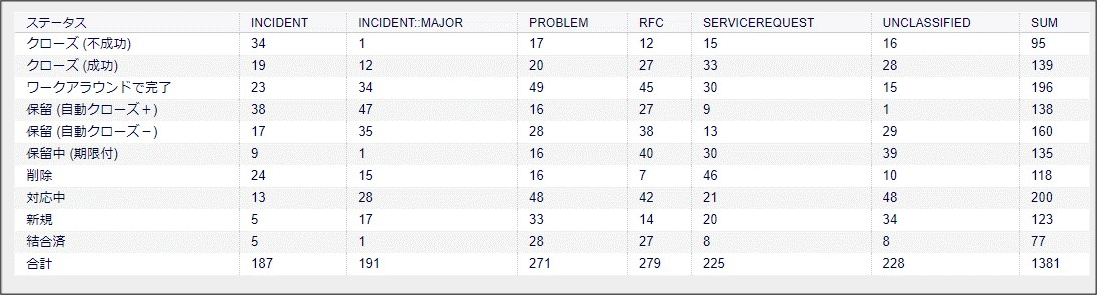 |
| Dynamic List | Generates a table that lists the objects that exist in OTOBO Example: List of tickets with attributes to be displayed 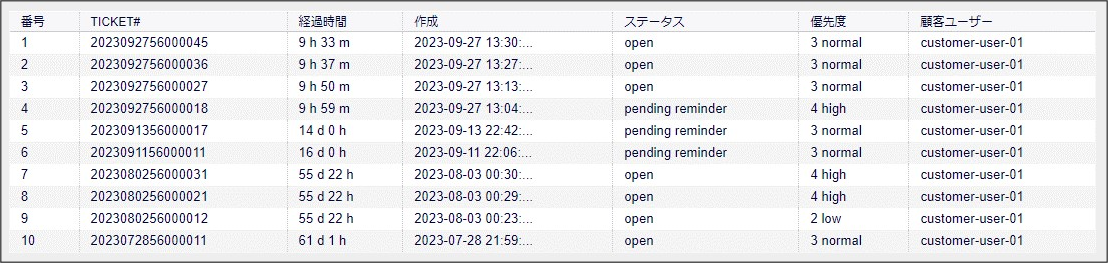 |
| Static | Statistics generated by special pre-defined calculations Only one type of statistics can be created per object type. |
4. Enter the required information in the [General Specification] field.
For more information on input fields, see the following.
For more information on input fields, see the following.
(Table) General specification input fields for creating statistics
| Field | Required | Description | Display | |
|---|---|---|---|---|
| Create | Edit | |||
| Title | Yes | Statistics title Displayed in the list of statistics. |
〇 | 〇 |
| Description | Yes | A description of the statistics. | 〇 | 〇 |
| Object type | Yes | Types of objects subject to statistics Refer to "(Table) Object types supported by Ops I" and specify object types supported by Ops I. |
〇 | 〇 |
| Permissions | Yes | Select "stats". | 〇 | 〇 |
| Result formats | Yes | Selectable formats for generating statistics Select from the following. (Multiple formats can be selected)
|
〇 | 〇 |
| Time Zone | Yes | Select the time zone for the date and time information used in the statistics output and calculations. If the statistics type is [Static], it is hidden. | 〇 | 〇 |
| Create summation row* | No | Selecting "Yes" will add a row to the last (bottom) row of the statistics with the sum of the values in each column. | 〇 | 〇 |
| Create summation column* | No | Selecting "Yes" will add a row to the last (right) column of the statistics with the sum of the values in each column. | 〇 | 〇 |
| Cache results | No | Leave the default value of "No". | × | 〇 |
| Show as dashboard widget | No | Leave the default value of "No". | × | 〇 |
| Validity | No | Leave the default value "valid". If you set "invalid", you will not be able to run statistics. | 〇 | 〇 |
(Legend) 〇: Displayed, ×: Not displayed
*When using [Create summation row] or [Create summation column], you should consider whether the result will be statistically meaningful totals. Because this total is calculated mechanically, it might include attributes that do not need to be included, as in the following example.
- If the statistics type is [Dynamic List] and a total column is added: Each column of the list "TICKET#", "TITLE", etc.
- If the statistics type is [Dynamic List] and a total row is added: "TICKET#", etc.
(Table) Object types supported by Ops I
| Types of statistics | Object type | Description |
|---|---|---|
| Dynamic Matrix | ITSMConfigItem | Total number of items constituting the "CMDB" function |
| Dynamic Matrix | TicketAccumulation | Tallies the number of tickets |
| Dynamic List | Ticketlist | Lists the number of tickets |
| Static | FAQAccess* | Aggregates the number of accesses and ratings to FAQ articles for a specified period of time |
| Static | OpenTicketCountPerDayPeriod | Aggregates the total number of tickets in the open status by number of days elapsed |
| Static | StateAction* | Specifies the year and month and tallies the number of changes to tickets that occurred on each date of the month Changes to tickets include not only changes from users, but also changes from the system. For the types of aggregated items (keys) supported by Ops I, see "(Table) StateAction aggregated items supported by Ops I". |
*The object types "FAQAccess" and "StateAction" are statistics that can only be referenced and implemented because they are provided by default. Therefore, they cannot be specified from the input field [Object type]. For statistics provided by default, see "(Table) List of supported statistics definitions provided by default".
(Table) StateAction aggregated items supported by Ops I
| Key (aggregated item) | Support | Description |
|---|---|---|
| AddNote | 〇 | Number of times a work note was added to a ticket |
| ArchiveFlagUpdate | - | |
| CustomerUpdate | 〇 | Number of times a ticket customer or customer user has been updated |
| EmailAgent | - | |
| EmailCustomer | - | |
| EmailResend | - | |
| EscalationResponseTimeNotifyBefore | - | |
| EscalationResponseTimeStart | - | |
| EscalationResponseTimeStop | - | |
| EscalationSolutionTimeNotifyBefore | - | |
| EscalationSolutionTimeStart | - | |
| EscalationSolutionTimeStop | - | |
| EscalationUpdateTimeNotifyBefore | - | |
| EscalationUpdateTimeStart | - | |
| EscalationUpdateTimeStop | - | |
| FollowUp | - | |
| LoopProtection | - | |
| Merged | - | |
| Misc | - | |
| NewTicket | 〇 | Number of times a ticket was created |
| OwnerUpdate | 〇 | Number of times the assigned user for the ticket has been updated The setting at the time of ticket creation is also counted as one time. |
| PhoneCallAgent | - | |
| PhoneCallCustomer | - | |
| PriorityUpdate | 〇 | Number of times ticket priority was changed The setting at the time of ticket creation is also counted as one time. |
| ResponsibleUpdate | - | |
| SLAUpdate | - | |
| SendAgentNotification | - | |
| SendAnswer | - | |
| SendAutoFollowUp | - | |
| SendAutoReject | - | |
| SendAutoReply | - | |
| SendCustomerNotification | - | |
| ServiceUpdate | - | |
| SetPendingTime | 〇 | Number of times the pending expiration date of a ticket has been changed The number of times the status of Ops I was set to pending and the number of times it was set from pending to another status are counted. |
| StateUpdate | 〇 | Number of times the ticket status has changed |
| Subscribe | - | |
| SystemRequest | - | |
| TicketDynamicFieldUpdate | - | |
| TicketLinkAdd | 〇 | Number of times a link between tickets was set When one link is created, the link in the opposite direction is created at the same time, so a single link-adding operation is counted twice. |
| TicketLinkDelete | 〇 | Number of times a link between tickets was deleted When one link is deleted, the link in the opposite direction is deleted at the same time, so a single link-deletion operation is counted twice. |
| TimeAccounting | - | |
| TitleUpdate | 〇 | Number of times the ticket title was updated |
| TypeUpdate | 〇 | Number of times the ticket type was updated The setting at the time of ticket creation is also counted as one time. |
| Unsubscribe | - | |
| WebRequestCustomer | - | |
| Bounce | - | |
| Lock | - | |
| Unlock | - | |
| DELETE | - | |
| Transfer | 〇 | Number of times the ticket contact person (queue) has been changed |
| Forward | - | |
| Sum | - |
5. From [Create Statistic], click the [Save] button.
After clicking the [Save] button, you will be taken to the [Edit Statistics] screen, where you can review the statistics you have created in the [Statistics Preview].
After clicking the [Save] button, you will be taken to the [Edit Statistics] screen, where you can review the statistics you have created in the [Statistics Preview].