1.2.3 Screen structure
This section describes the OTOBO screen.
(Figure) Screen structure of OTOBO
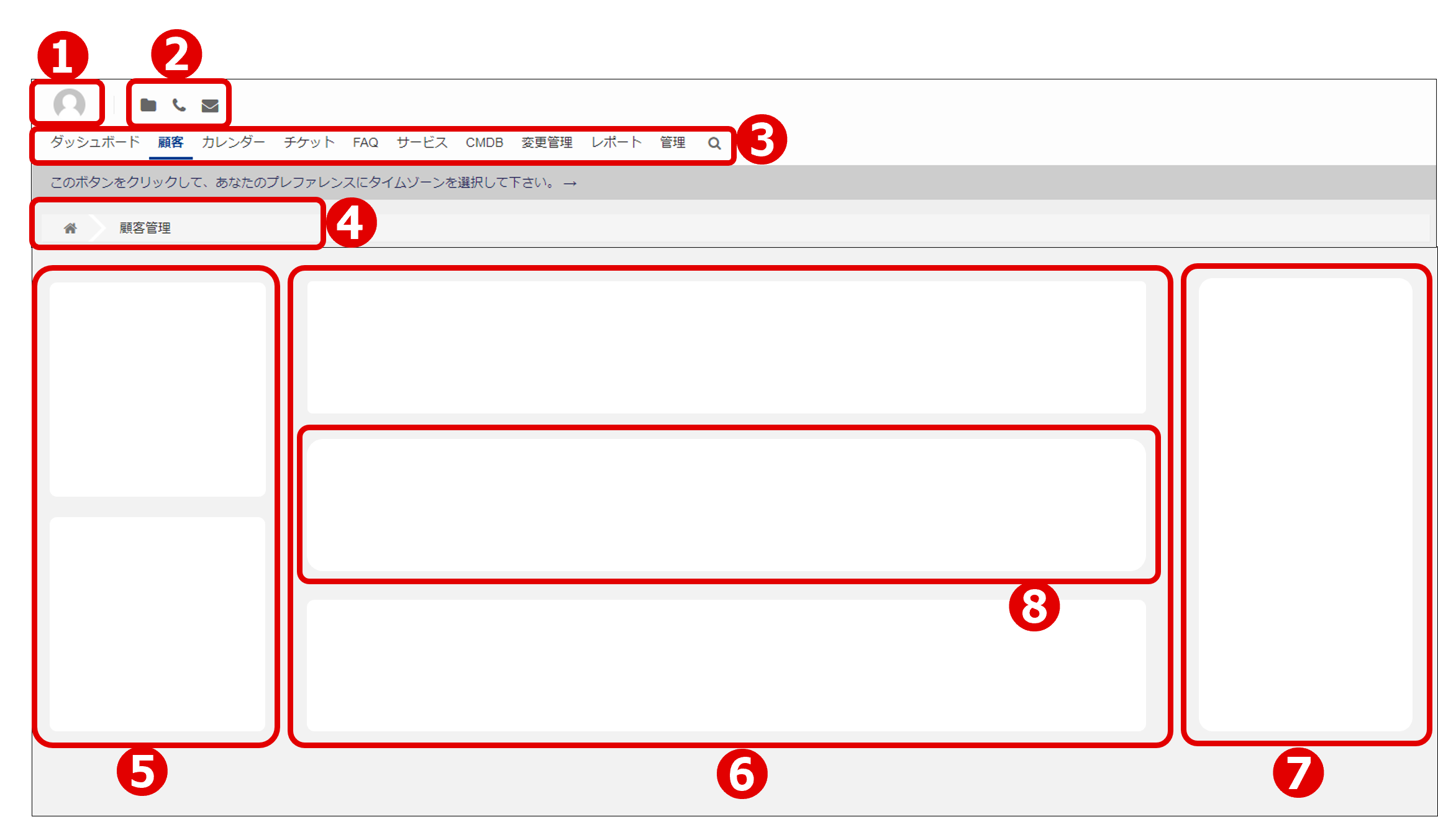
When you access the OTOBO screen, you will see the upper headers ① through ③ that are common to all OTOBO screens.
- ① Avatar icon
- ② Toolbar icons
- ③ Main menu
For details, see descriptions of "Avatar image", "Toolbar icons" and "Main menu" in the OTOBO manual.
https://doc.otobo.org/manual/user/11.0/en/content/agent/dashboard/dashboard.html
https://doc.otobo.org/manual/user/11.0/en/content/agent/dashboard/dashboard.html
Other than the top header, the rest of the list consists of the following areas ④ to ⑦.
- ④ Breadcrumb list
- ⑤ Left sidebar
- ⑥ Main area
- ⑦ Right sidebar
Depending on the function, the left and right sidebars might or might not be displayed. In addition, the left sidebar, main area, and right sidebar are divided by widgets ⑧.