2.7.2 Setting up SAML connection
This section describes the connection setup procedure when using SAML as the protocol for authentication for IdP linkage.
When using SAML, the SAML assertion must be able to obtain the user ID (username), first name, last name, and e-mail address.
The following is the procedure for setting up an IdP using SAML.
(Figure) Setting up SAML connection
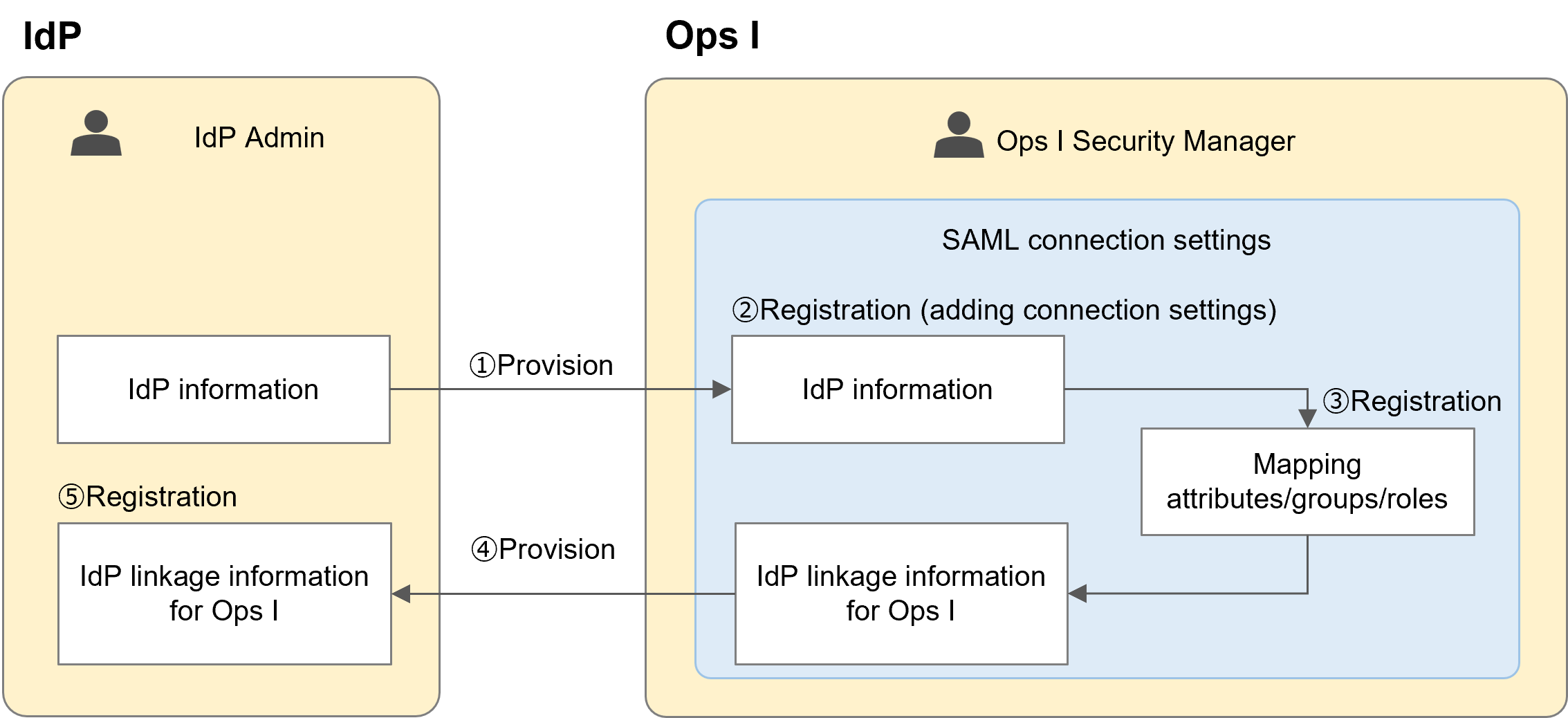
① Providing information set in the IdP to Ops I
The IdP administrator provides the Ops I security administrator with information such as the IdP's identity provider entity ID and single sign-on service URL (AuthnRequest URL). When using the identity provider metadata (XML file) in Step ②, provide the identity provider metadata.
The IdP administrator provides the Ops I security administrator with information such as the IdP's identity provider entity ID and single sign-on service URL (AuthnRequest URL). When using the identity provider metadata (XML file) in Step ②, provide the identity provider metadata.
② Adding an SAML connection setting and registering IdP information with Ops I
The Ops I security administrator adds an SAML connection setting and registers the IdP information including the service provider entity ID in it. When using the identity provider metadata, information on the IdP can be automatically entered.
The identity provider metadata can only be specified when adding a new SAML connection setting.
For information on adding SAML connection settings and using the identity provider metadata, see "Adding SAML". For information on the contents of the identity provider metadata, see "Identity provider metadata example".
SAML certificates can be configured for SAML connection settings. This allows the legitimacy of the communication destination to be verified. However, certificates must be renewed periodically. For information on renewing certificates, see "Updating SAML certification".
The Ops I security administrator adds an SAML connection setting and registers the IdP information including the service provider entity ID in it. When using the identity provider metadata, information on the IdP can be automatically entered.
The identity provider metadata can only be specified when adding a new SAML connection setting.
For information on adding SAML connection settings and using the identity provider metadata, see "Adding SAML". For information on the contents of the identity provider metadata, see "Identity provider metadata example".
SAML certificates can be configured for SAML connection settings. This allows the legitimacy of the communication destination to be verified. However, certificates must be renewed periodically. For information on renewing certificates, see "Updating SAML certification".
③ Registering attribute/group/role mappings
Register IdP user information and Ops I user attribute information, and group and role mappings. For details, see "Mapping attributes/groups/roles".
Register IdP user information and Ops I user attribute information, and group and role mappings. For details, see "Mapping attributes/groups/roles".
④ Providing IdP linkage information set in Ops I
The Ops I security administrator provides the information of the connection setting of the [Service Provider Identity ID] added in Step ② to the IdP administrator.
When using the service provider metadata (XML file) in Step ⑤, output the service provider metadata from the connection setting and provide it to the IdP administrator. The service provider metadata can only be output on the SAML "Connection setting details" window.
For information on outputting the service provider metadata, see "Connection setting detail window".
The Ops I security administrator provides the information of the connection setting of the [Service Provider Identity ID] added in Step ② to the IdP administrator.
When using the service provider metadata (XML file) in Step ⑤, output the service provider metadata from the connection setting and provide it to the IdP administrator. The service provider metadata can only be output on the SAML "Connection setting details" window.
For information on outputting the service provider metadata, see "Connection setting detail window".
⑤ Registering the connection setting information set in Ops I with the IdP
The IdP administrator registers the connection setting information set in Ops I with the IdP so that Ops I can be connected to the IdP as a service provider. When using the service provider metadata, the connection setting information set in Ops I can be automatically registered.
The IdP administrator registers the connection setting information set in Ops I with the IdP so that Ops I can be connected to the IdP as a service provider. When using the service provider metadata, the connection setting information set in Ops I can be automatically registered.
Subsection structure
2.7.2.1 Updating SAML certification